OldSnap: foreign-language screenshots, redrawn in your language with the layout intact. Learn more

Oldview

Windows image viewer Free

Design files, photos and PDFs.
Open, view, edit, save.

Oldview is a free Windows image viewer from Oldlee. Open everyday images, PSD/PSB files, compatible AI files, camera RAW and multipage PDFs in one window. Crop, rotate, resize, compress, convert formats or process a batch. Choose an installer or a portable ZIP.

  • Windows 10 / 11
  • x64 · Free
pic.eeoo.dev
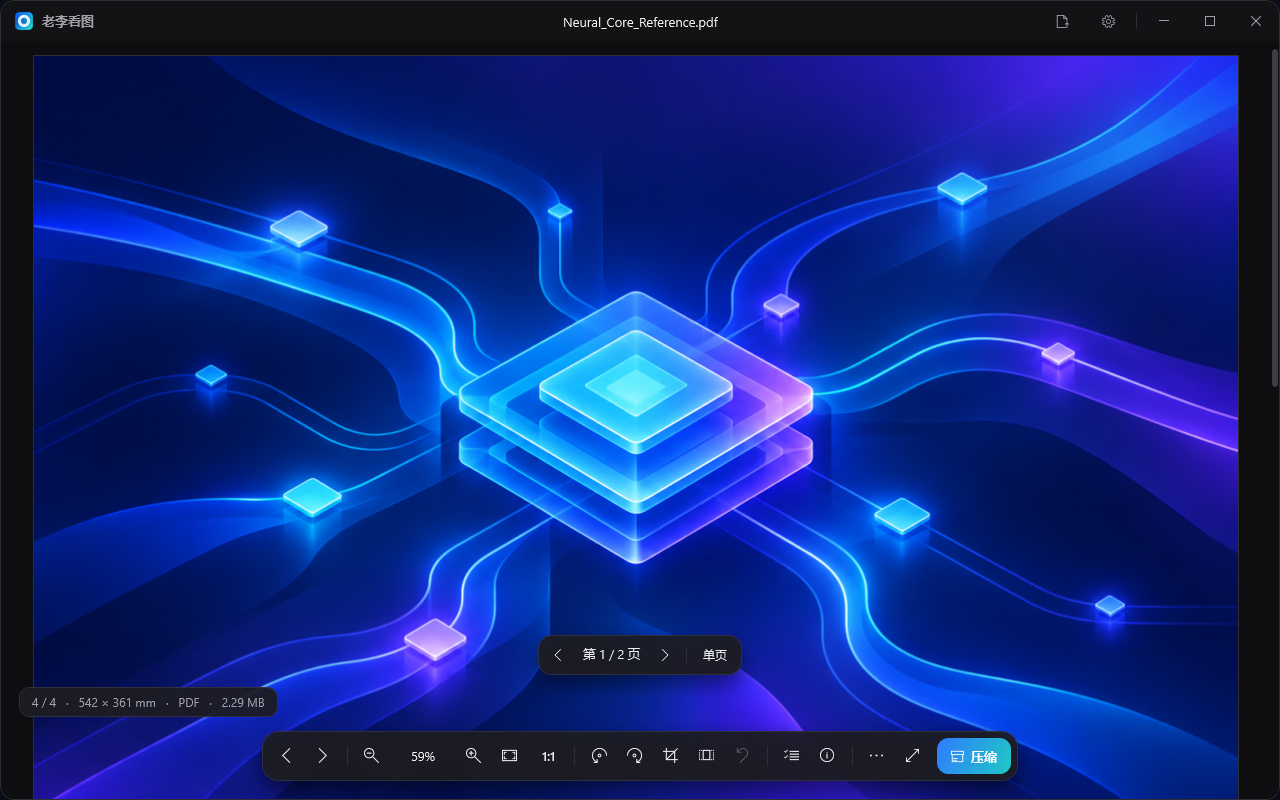
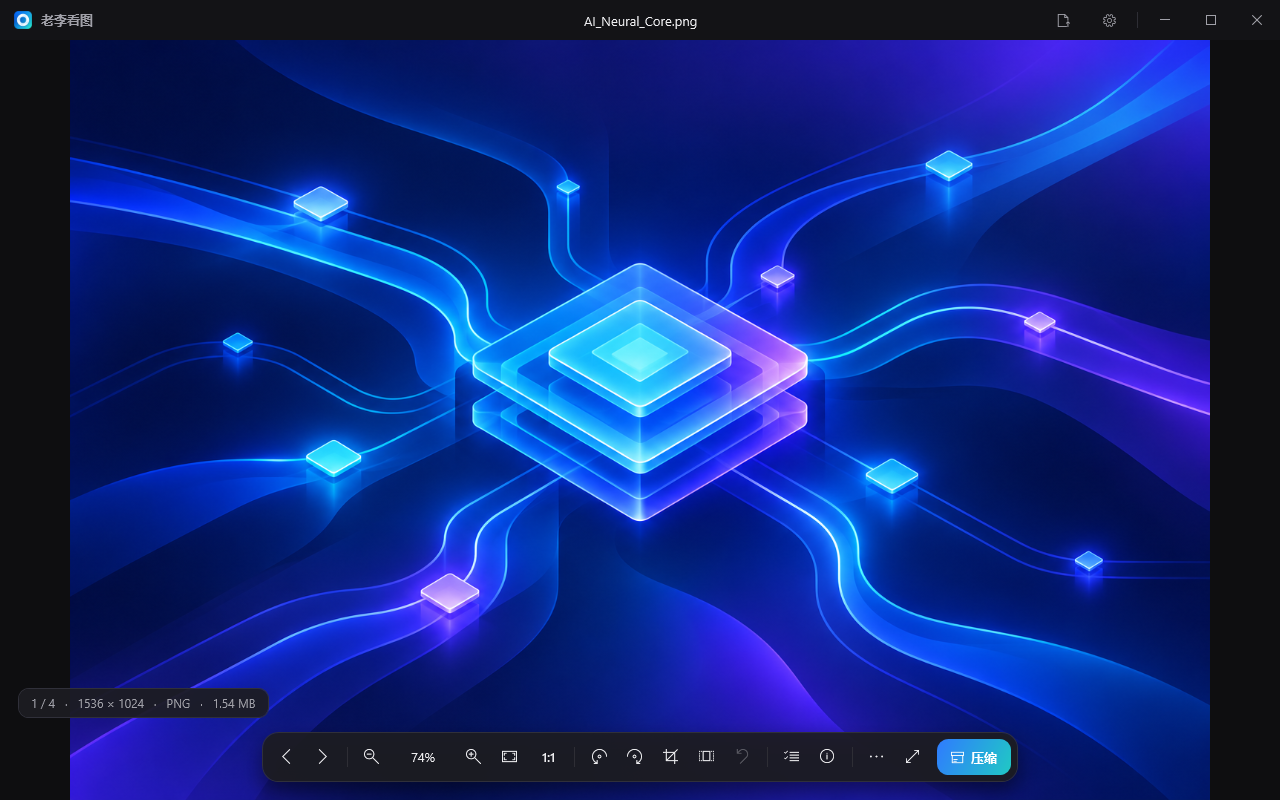
The actual Oldview 0.4.0 window displaying a blue and violet neural-network sample, image details and the bottom toolbar
01

Everyday images and design files together

Open JPG, PNG, WebP, AVIF, HEIC, GIF, PSD/PSB, many camera RAW formats, PDF and AI files with PDF-compatible content. Drop in a file, browse with the arrow keys, zoom with the wheel or inspect actual pixels. Nearby images are preloaded in the background.

Actual Oldview window viewing the neural-network sample
02

Read multipage PDFs and redraw when you zoom

Switch multipage PDFs between continuous scrolling and single-page view. Unedited PDFs and compatible AI files can redraw the visible area at screen-pixel resolution after zooming. Browse multipage TIFFs page by page; edits to multipage files affect the current page.

Actual Oldview multipage PDF reading interface
03

See the size before saving a compressed copy

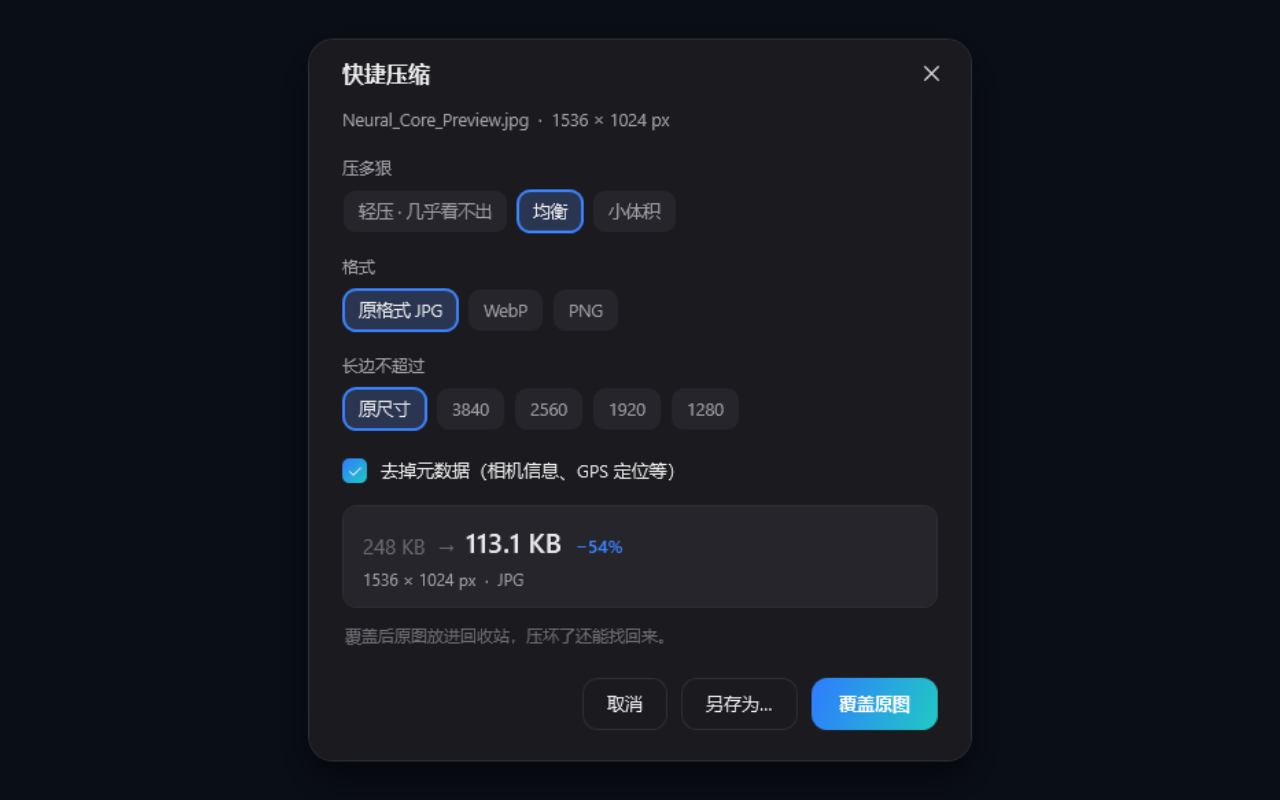
Choose light, balanced or small-file compression and preview the size after actual encoding. Limit the long edge, pick JPG, WebP or PNG, and optionally remove camera and GPS metadata. Oldview also tells you when the result would be larger.

Oldview compression settings with presets, formats and encoded size
04

Crop, rotate and resize, then choose how to save

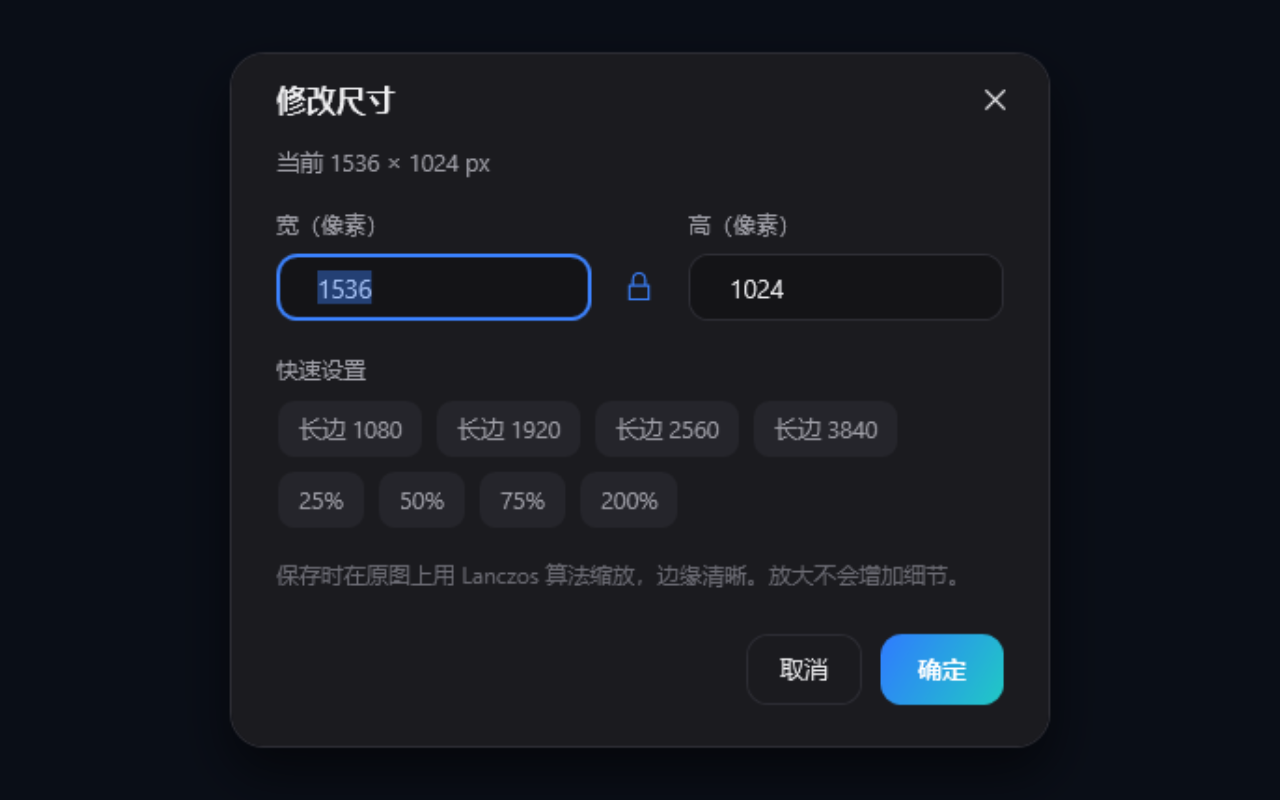
Crop, rotate either way, flip horizontally or vertically, resize and undo edits. Save a new file or overwrite when supported; change formats in Save as. Read-only formats, animations and multipage files restrict overwriting to help avoid losing other content.

Oldview resize dialog with width, height and aspect-ratio lock
05

Apply one set of settings to a batch

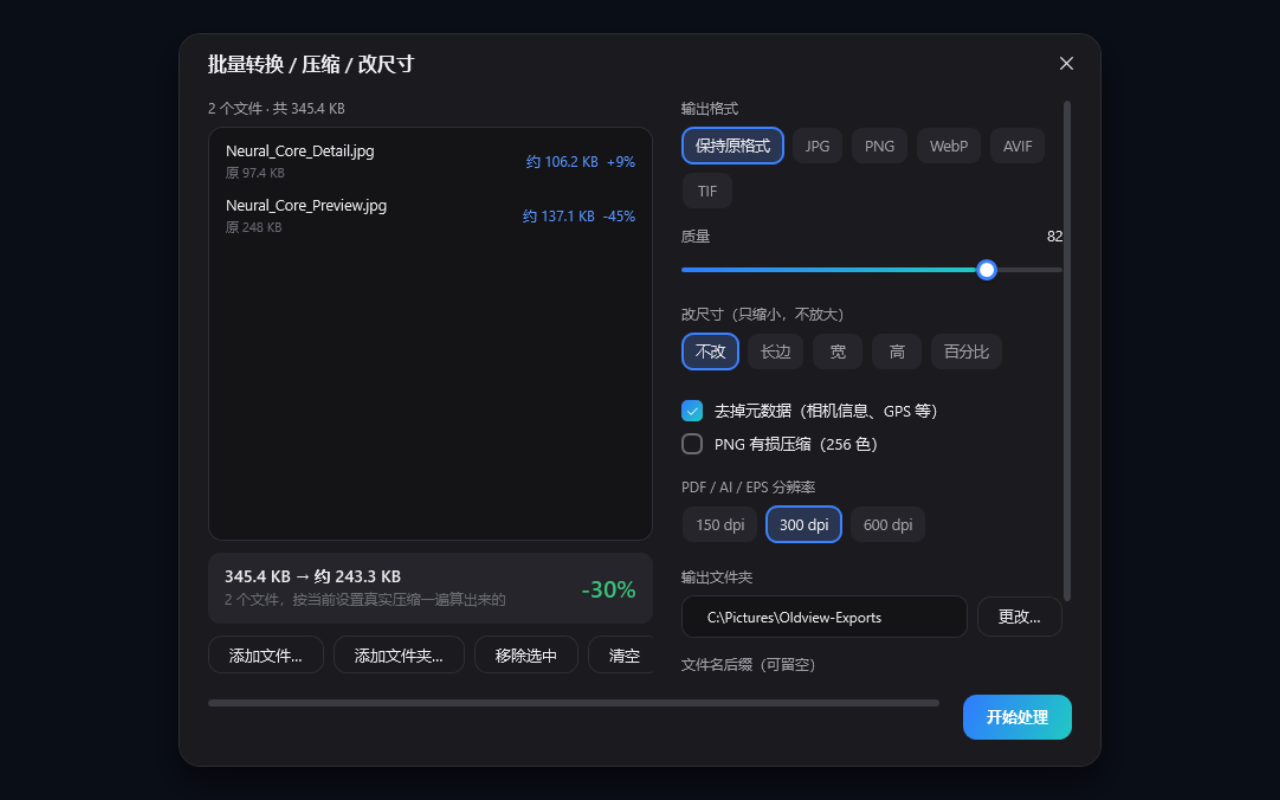
Drop files or folders into batch processing to compress, convert or reduce dimensions. Estimate each output size first, then choose an output folder and filename suffix. Existing files are kept: colliding output names get an automatic number.

Oldview batch-processing window with two sample images and size estimates
06

Themes, shortcuts and default-app settings

Choose dark, light or system theme and customize the viewing background, wheel behavior and animations. Common actions have shortcuts. File-association settings show the current status and offer a reminder and recovery entry if another app takes over.

07

Local processing, straightforward installation and updates

Viewing and editing happen on your PC. The installer defaults to the current user; the portable version runs after extraction. Installed copies can download an installer from the website, verify SHA-256 and update. Portable copies are updated by downloading a new version manually.

Specs & requirements

System
Windows 10 / 11, 64-bit x64. No macOS, Linux or mobile version yet.
Current version
0.4.0 · Released October 20, 2026.
Installation
Per-user installer or portable ZIP. Runtime files are included; no separate .NET installation is needed.
Download size
Version 0.4.0: installer about 154 MB, portable ZIP about 83 MB, extracted application about 195 MB.
Main input formats
JPG, PNG, BMP, TIFF, WebP, AVIF, HEIC, GIF, PSD/PSB, PDF, compatible AI, SVG and many camera RAW formats. Some encoding variants may not open.
Save-as formats
JPG, PNG, WebP, AVIF, TIFF, BMP, GIF, ICO and PDF. Animation and multipage processing primarily uses the current frame or page.
Color and precision
8-bit display and export. Embedded color profiles can be converted to sRGB; unprofiled CMYK uses FOGRA39.
Internet
Local viewing and editing do not need a continuous connection. Version checks, installer downloads and website access need the internet.
Permissions and files
Normal installation needs no administrator rights. Enforcing default associations needs administrator approval. Choose where Save as and batch outputs go.
What it can’t do yet

Better you know now than after you install it.

  • Windows x64 only. No 32-bit Windows, macOS, Linux or mobile versions.
  • PSD/PSB viewing uses the merged image. Layers cannot be viewed, edited or saved back as layers.
  • AI files need PDF-compatible content. EPS and older PostScript files need a separate Ghostscript installation; some file variants may not open.
  • PDF/AI edits and exports operate on an image of the current page, without preserving vector objects, editable text or the full multipage document. This is not a PDF layout, annotation or OCR tool.
  • Display and export are 8-bit. It does not preserve 16-bit precision and is not an HDR color-grading tool.
  • SVG/EPS do not offer PDF-style regional vector redraw. Editing a PDF/AI image also disables that redraw for the current preview.
  • Overwrite recovery through the Recycle Bin is not guaranteed. Network and removable drives may replace files directly; save a copy or back up important originals.
  • Enforced default associations affect accounts across the PC, require administrator rights and take effect after signing in again. Home edition is not guaranteed; protected formats may still need confirmation in Windows settings.
  • Portable copies do not install updates automatically. Important releases may require an update; a previously recorded mandatory update can still require an online check before offline use resumes.

Pricing

Free use

The installer and portable ZIP include the same current features.

Free

  • Local viewing and basic editing
  • Compression and format conversion
  • Batch processing
Free download

Version 0.4.0 is free to download and use. There are no paid tiers, account registration or subscriptions.

FAQ

Is it really free? Do I need an account?

Version 0.4.0 is free to download and use, with no subscription, paid tier or account registration. The installer and portable version have the same features.

Should I choose the installer or portable ZIP?

Choose the installer for Start menu access, an uninstall entry and installed-copy updates. Choose the portable ZIP to extract and run. Normal installation is per-user and needs no administrator rights; enforcing default associations is a separate administrator action.

Why will some AI, EPS or RAW files not open?

AI files generally need PDF-compatible content saved with them. EPS and older PostScript files need a separate Ghostscript installation. Camera RAW and other formats also depend on the exact encoding variant, so not every file is guaranteed to work.

Do edits overwrite my original?

You can save a new file or overwrite when supported. Overwrite first tries to move the original to the Recycle Bin; network or removable drives may replace it directly. Animations, multipage and read-only formats restrict overwriting. Keep copies of important files.

Can it directly edit PDF and PSD documents?

You can crop, rotate, resize and export the displayed image. PSD uses the merged picture; PDF/AI processing covers the current page. It does not edit layers, page layout, text objects or a whole multipage document.

Can I work offline? How do updates work?

Viewing and basic editing happen locally. Online version checks are available; installed copies download an installer and verify SHA-256, while portable copies need a manual download. Important updates may be mandatory, and recorded requirements can remain active offline.

Why must I confirm the default app?

Windows protects some formats that already have a default app, so confirmation in system settings may be needed. Optional enforced associations require administrator rights, affect accounts across the PC and apply after signing in again. Home edition is not guaranteed.

Are my images sent to a server?

Viewing, zooming, editing and compression happen on your PC without uploading images first. Version checks and update downloads contact the website. Opening the website, social links or other external pages also needs a network connection.

Changelog

  1. 0.4.0

    Compression, Save as and online updates

    • Added website version checks and installed-copy updates with SHA-256 verification; portable users download new versions manually.
    • Crop and resize now lead to overwrite or Save as; format conversion is part of Save as.
    • Quick compression offers light, balanced and small-file presets with actual encoded sizes.
    • Multipage PDF scrolling, batch processing, themes and file-association settings remain available.
    • Fixed the installer opening-animation error and improved colliding batch names, installation path checks and rollback on failed upgrades.

Oldview

Design files, photos and PDFs.
Open, view, edit, save.

More from Oldlee