New: Oldview, a free image viewer for Windows. Version 0.4.1 is out. Take a look

Weavora 织序

AI workspace for teams Business

Say what needs doing.
Get it to the right person.

Bring work out of scattered chats, files and spreadsheets. Weavora finds people by skills and capacity, tracks delivery, review and archiving, and turns approved team knowledge into reusable workflows. Use Windows or a browser, in the cloud or on your server. This is a pilot-stage product; all screenshots and the video use demo-company data.

  • Windows app
  • Desktop browser
  • Mobile browser
weavora.cc
4 agents
Up to four agents in a joint status report
30 backups
Keep the latest 30 automatic daily backups
2 options
Cloud hosting or your own server
01

Start with a conversation

Assign work, find information and ask for progress in one workspace. Mention department or role agents, or bring up to four into a joint report. Joint reports are read-only; use the workbench separately to execute. Tasks, tables and metrics appear as cards.
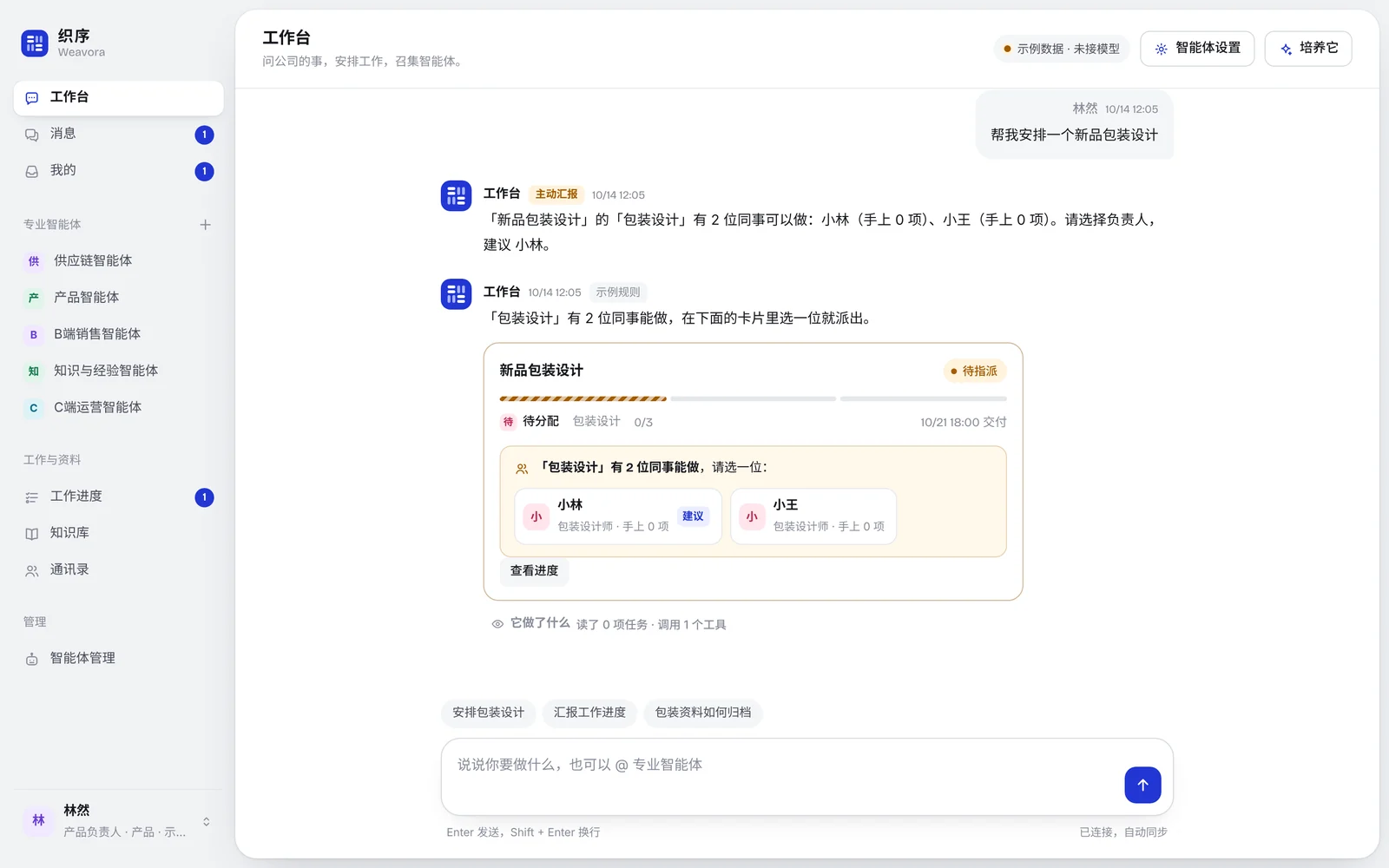
Demo workbench with a packaging request and assignee selection card
02

Match skills, then check capacity

By default, one match is assigned directly and several matches require your choice. Capacity mode can assign automatically using department, skills and time available before the deadline. Missing resources stay visible instead of being reported as work in progress.

Demo assignment card comparing two packaging designers and a suggested assignee
03

Move from delivery to review to archive

The assignee starts work, uploads files and hands off to a reviewer. Rejections and file versions stay on record; independent reviewers cannot approve their own delivery. Approved files are checked, archived and entered in an internal ledger with CSV export. Waiting time and recorded work time are separate; no computer monitoring.

Demo task showing packaging design, compliance review and automatic archiving
04

Teach a rule, then approve it

Explain how your team works. The agent drafts personal, department or company memories, documents and workflows. The responsible person reviews them before they become shared rules. This builds editable knowledge and processes; it does not retrain the underlying model.

Demo training suggestions for memories, documents and workflows awaiting approval
05

Reuse the process that worked

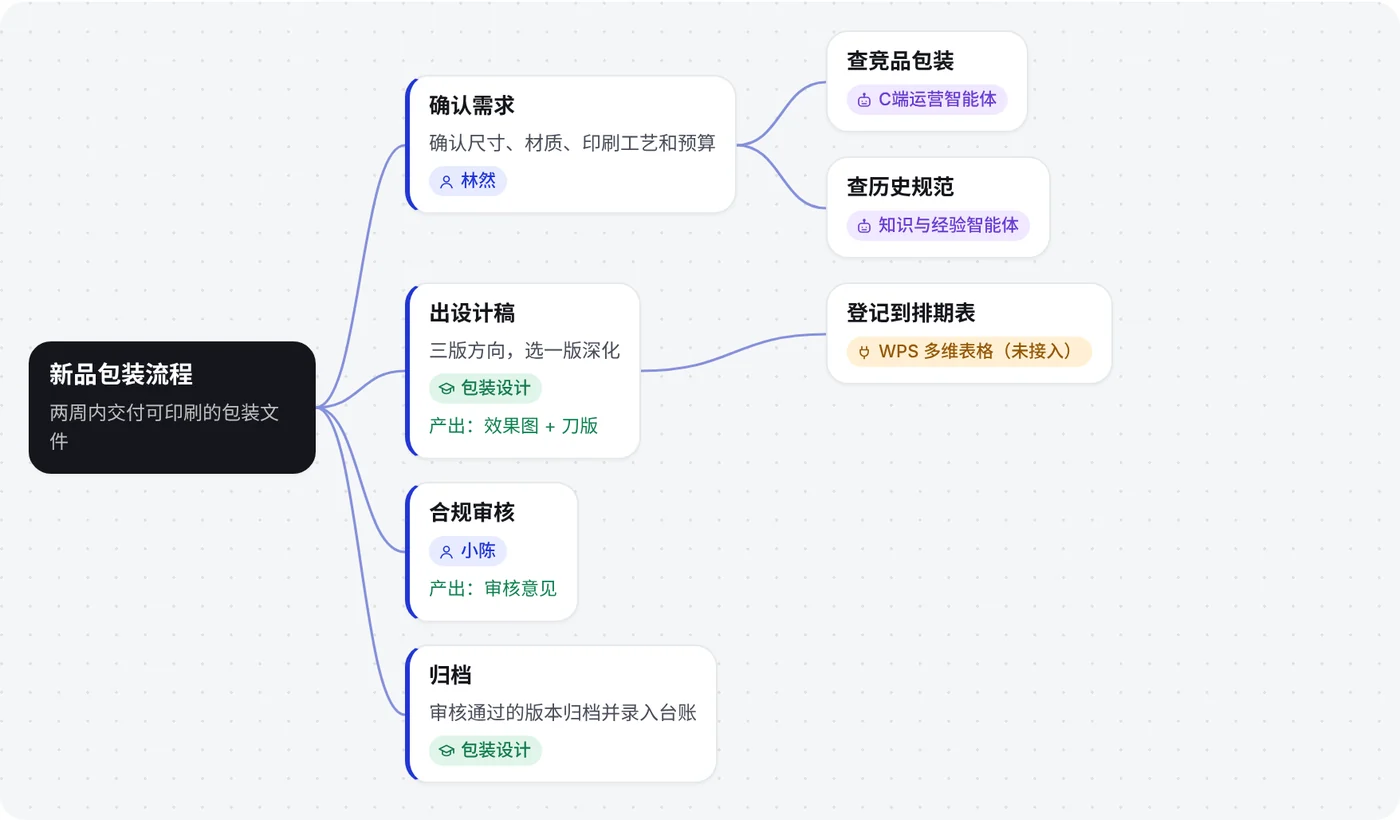
Save a successful sequence as a workflow and edit its departments, skills and estimates in a mind map. Each new run checks people and capacity again. Eligible tasks that have not started can adopt a newer approved workflow while preserving the old snapshot and completed work.

Demo workflow mind map with steps, required skills and responsible departments
06

Keep people, messages and knowledge connected

Department groups, company chat, private messages and a directory sit beside the work. Assignment and blocker notices reach the people involved. Import Word, Excel, PDF and CSV into the knowledge base; add an embedding model for semantic search. Access follows permissions and connected sources can be checked.

Demo knowledge base with packaging specifications, categories and document content
07

See blockers and inspect actions

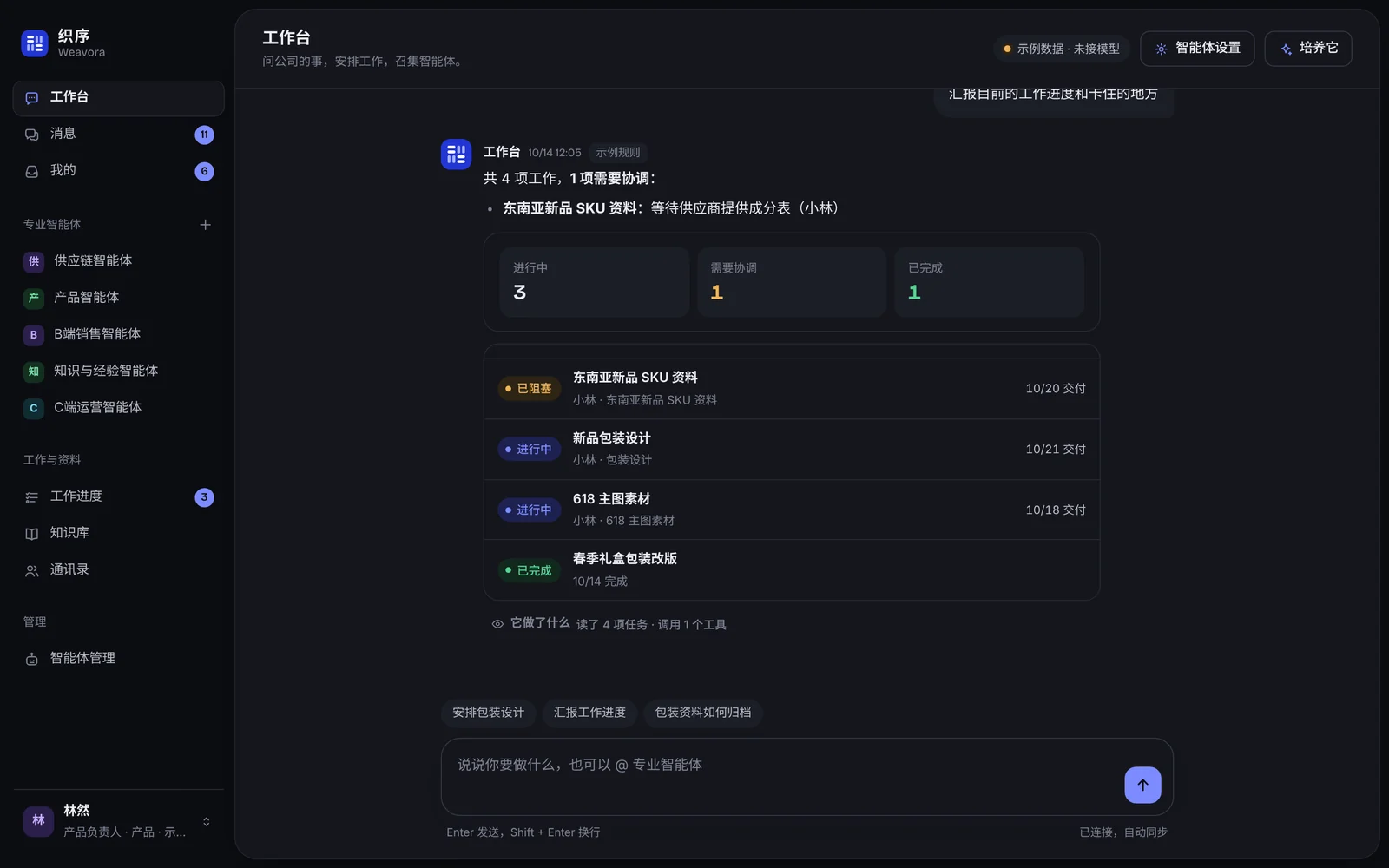
Report blockers, overdue tasks or scheduled updates with the owner, current step and missing information. Expand the execution trace to see data read, tools called and usage. Administrators configure and authorize MCP or HTTP plugins; write operations request human approval.

Demo progress report showing active, blocked and completed work
08

Choose cloud or self-hosting

Windows, desktop and mobile browsers use the same workspace. Each company has a separate database and file directory with role and department permissions. Back up daily, restore or export company data, and track model usage, cost estimates and budget caps. Cloud and self-hosted deployments use the same software.

Demo dark-mode workbench with task cards and department agents

Specs & requirements

Current version
0.4.1. The 18 October 2026 update covers email, support links and login-email migration.
Clients
Windows x64 app, desktop browsers and mobile browsers. The software interface is currently mainly Simplified Chinese.
Deployment
Cloud at app.weavora.cc or self-hosted. A private server, domain and backup storage are separate requirements.
Model requirements
Bring an OpenAI-compatible model account with tool calling. Semantic search also needs an embedding model. Pay the provider directly.
Access
Email codes expire in 10 minutes and lock after five failed attempts. The operations console also uses an authenticator. Company access follows roles and departments.
Files and data
Import Word, Excel, PDF and CSV. Keep delivery versions, export the internal ledger as CSV and export company data as a ZIP.
Backups
Keep the latest 30 automatic daily backups, create manual backups and restore. The current state is backed up before a restore.
Support
support@eeoo.dev or https://t.me/oldleeoo. Verification emails come from no-reply@eeoo.dev.

What it can’t do yet

Better you know now than after you install it.

  • This is a pilot-stage product. Validate one team and one real workflow before a company-wide rollout. Member limits are not concurrency guarantees.
  • ERP, CRM, DingTalk and online spreadsheets do not connect automatically. Mabang, Xiaoman and U8 templates exist, but live business-account integration has not been accepted; authorization and adaptation are required.
  • Attendance and leave calendars are not connected. Capacity uses configured workdays; mark people unavailable manually. Preflight checks do not reserve future capacity.
  • Training stores approved knowledge, memories and workflows; it does not fine-tune the model. Model output can be wrong and important decisions need human review.
  • Scanned-PDF OCR, image-based product search and automatic competitor or store-data collection are not connected. Importing documents does not provide these capabilities.
  • Weavora does not create final designs, perform physical inspections or ship goods for employees. An archived internal task is not proof of delivery or a financial-system entry.
  • Online payments, SMS login and native mobile apps are not available. Signed remote updates with automatic rollback are unfinished.
  • Model calls, servers, implementation, training and customization cost extra. Oldlee operates the cloud servers; choose self-hosting for stricter data control.

Pricing

Pilot

Start with one team and one workflow.

CNY 19,800per year

  • Up to 20 members
  • Maintenance, updates and general new features
Discuss a pilot

Growth

For a small organization working across departments.

CNY 48,000per year

  • Up to 50 members
  • Maintenance, updates and general new features
Discuss Growth

Enterprise

For larger organizations, with maintenance scope defined by contract.

CNY 98,000per year

  • No member cap; deployment capacity assessed separately
  • Maintenance, updates and general new features
Discuss Enterprise

Annual subscriptions in Chinese yuan (CNY), including maintenance, updates and general new features. Model usage, hosting, deployment, training and customization are extra. We confirm scope and contract before manual activation. Customization starts at CNY 68,000 for a focused project, CNY 128,000 for business integration and CNY 248,000 for complex work; the contract defines scope and fees.

Weavora

Request a demo

Tell us about your team. We’ll book a live walkthrough and answer questions about deployment and pricing.

Or email us directly:
lee@eeoo.dev

Team size
Deployment

FAQ

How is this different from chat or an ERP?

Chat handles conversation; ERP and CRM systems hold business records. Weavora connects who takes a task, what they deliver, the next step and the reviewer. Authorized integrations can connect existing systems, but Weavora does not replace them or put demo records into production accounts.

Can assignment be fully automatic?

Capacity mode selects people by skills and time remaining before the deadline. The default assigns one match directly and asks you to choose between several. Work waits when no one fits. Skills, availability and real schedules still need to be maintained.

Can workflows grow out of everyday work?

Training conversations and completed work can become workflow drafts. A responsible person reviews and edits them before reuse. One temporary workaround does not automatically become company policy, and the underlying model is not retrained.

Who pays for model usage?

You bring a model account and pay the provider directly, outside the subscription. Weavora records calls and estimated costs and supports person and agent budget caps. Without a model, the local demo uses preset rules rather than open-ended conversational understanding.

Who controls the data? Can we export after expiry?

Companies have separate databases and file directories. Oldlee operates cloud servers; this is not a promise that operators cannot access data. Self-hosting is available. Subscription expiry restricts the workspace but still permits a full company-data export.

How do we start? Must we map every process first?

Contact @oldleeoo on Telegram or support@eeoo.dev. Choose one team and one existing workflow, prepare skills and source material, then validate delivery, review and archiving. Subscriptions are annual; implementation and customization are separate. You do not need every company process finalized on day one.

Changelog

  1. 0.4.1

    Execution, task continuation and email security

    • Reuse approved workflows, check resources before execution and repair eligible unstarted tasks while preserving earlier snapshots.
    • Update task and local order progress with permission-aware reporting. Internal records do not imply an external ERP sync.
    • Change a login email while keeping the account, company memberships and existing authenticator. Updated verification emails and support links.

Weavora

Say what needs doing.
Get it to the right person.

More from Oldlee