OldSnap: foreign-language screenshots, redrawn in your language with the layout intact. Learn more

Vela

AI travel planner

Turn saved places
into your next trip.

Plan a trip in your browser with Vela AI. Share your destination, dates and preferences, or send a saved link or screenshot. Check the places and review suggested changes before applying them. Keep your daily itinerary, map, flight and stay details, packing list and shared expenses in one place.

  • Desktop browsers
  • Mobile browsers
  • 中文 · English · 한국어
nowvela.com
Vela's current workspace with a Lisbon sample trip, daily itinerary and map. Demo data is used.
01

Talk it through, then approve the changes

Want a later start, a shopping day or coffee near a landmark? Tell Vela AI. It uses your current itinerary and place search to suggest changes. Review them before applying, or edit times, durations, order and notes yourself.
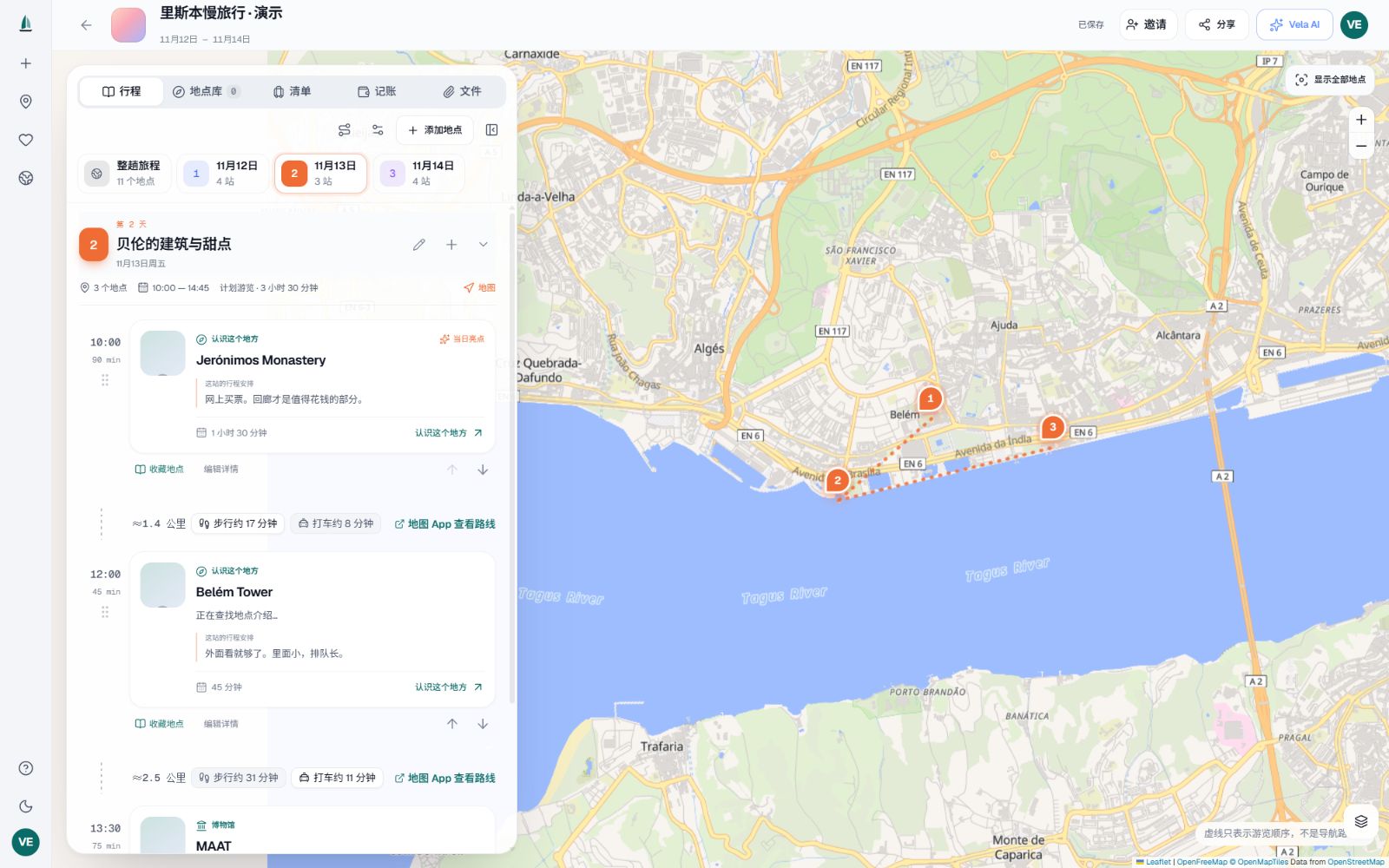
Lisbon demo itinerary and place map in Vela's workspace
02

Find places in links and screenshots

Send a public travel link or screenshot. Vela AI reads available place clues and checks names and locations with place search. Add a result to your itinerary or keep it for later. Login walls, platform restrictions or unclear images may require pasted text, an address or a clearer screenshot.

03

See each day alongside the map

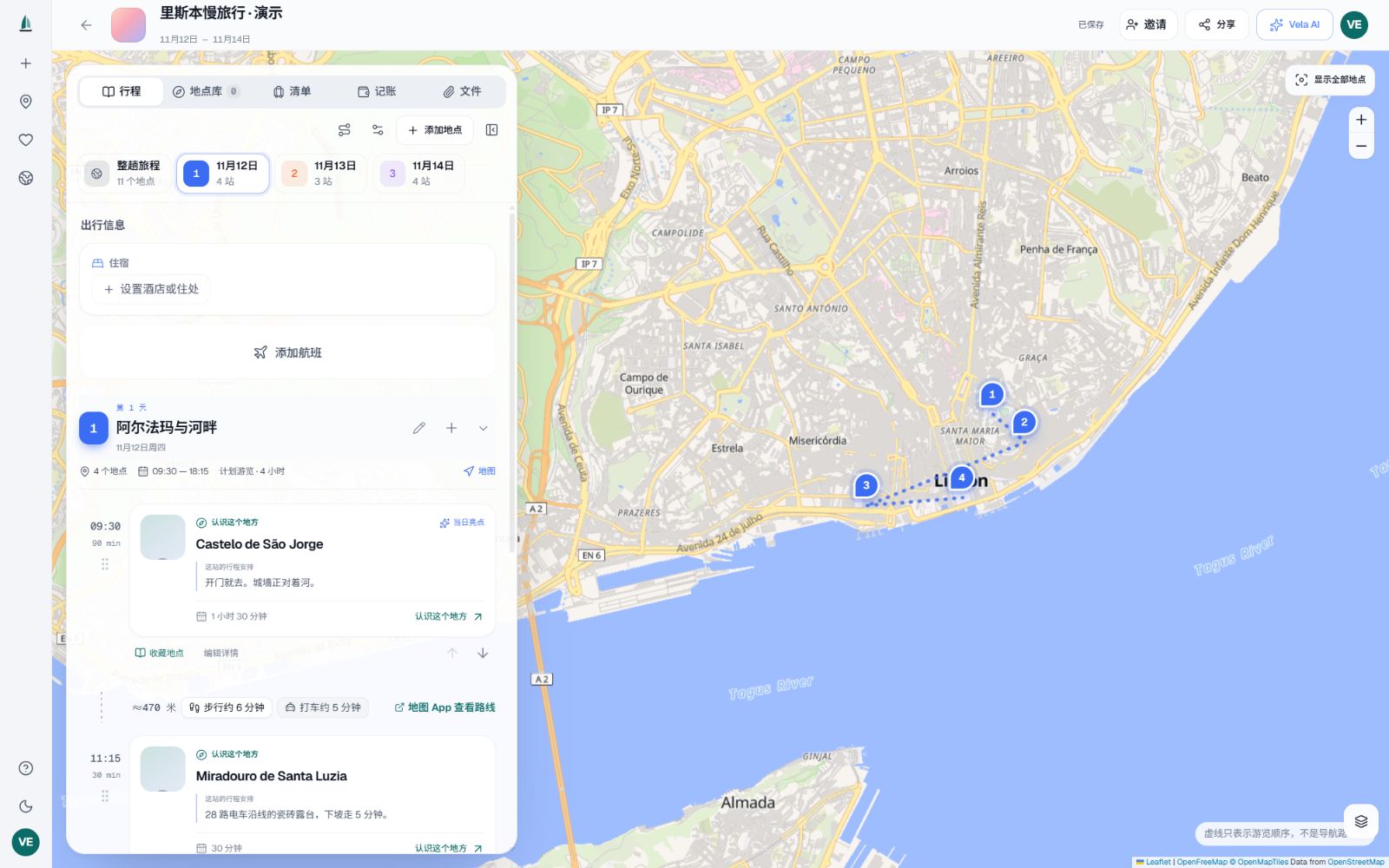
Arrange sights, meals and visit times by day, and compare locations on the map. Reorder stops, move them between days or try a shorter order by distance. Walking and taxi times are estimates. Open a map service for directions when you travel.

A Lisbon sample itinerary organized by day alongside its map
04

Keep flights and stays with the plan

Record your own flight and accommodation details alongside dates and travel notes. Weather and journey estimates help with planning. Vela does not book flights, hotels or restaurants, or automatically confirm availability and opening hours.

05

Plan with the people coming along

Invite others as editors or viewers. Members open the trip in their own browsers; authorized edits sync to other members within a few seconds. You can also create a trip-sharing link for people who only need to see the plan.

06

Pack, track costs and keep the documents

Check off packing items, record who paid and split shared expenses. Keep ticket and booking PDFs or images with the trip so members can access them. Storage and individual file limits depend on your plan.

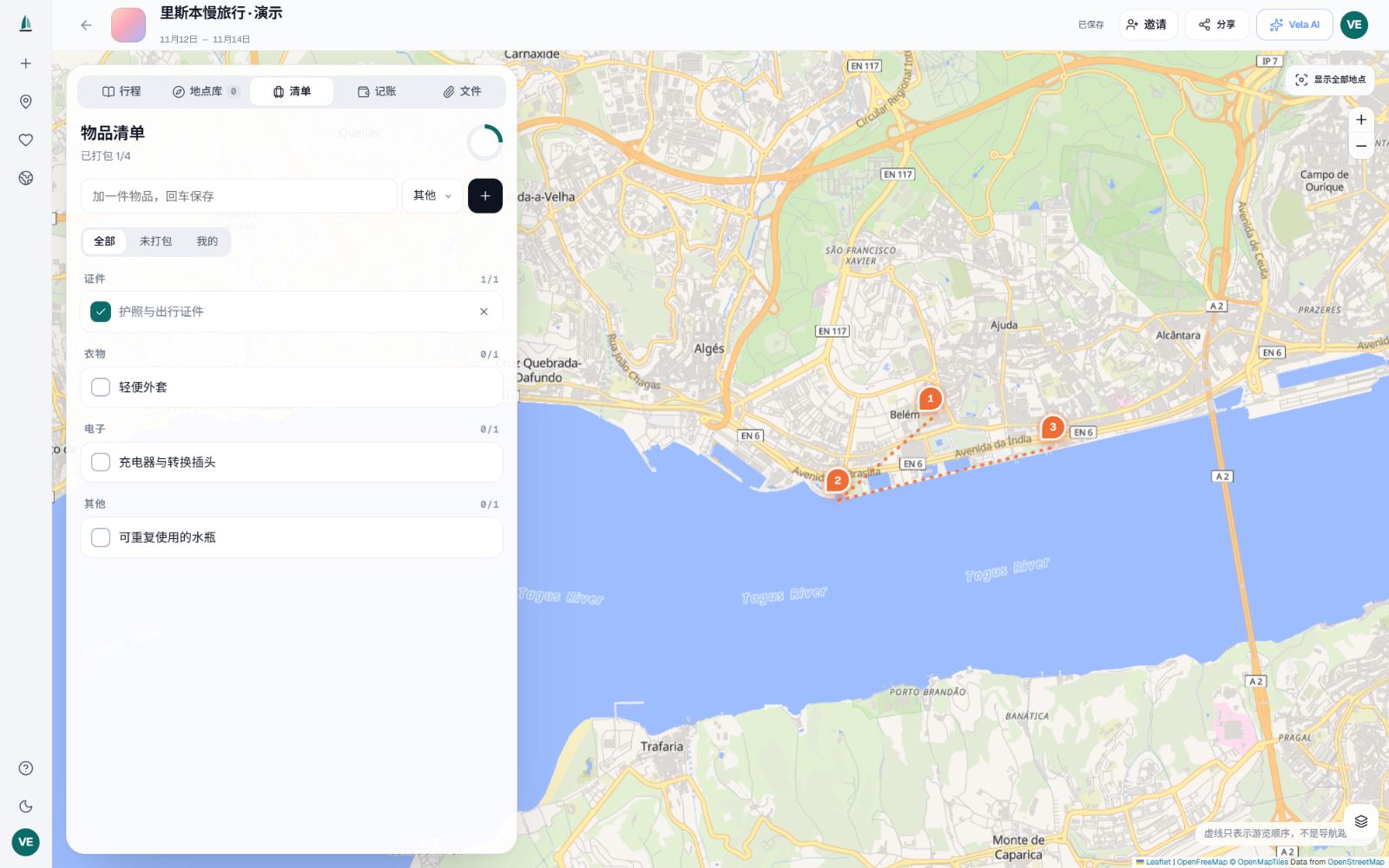
Packing checklist and progress in a sample trip
07

Keep places for the next journey

Save favourite places and add them to another trip later. Choose or upload a cover and revisit your travel records in Footprints. Plan on a computer and continue in your phone's browser. The app supports Simplified Chinese, English and Korean.

Specs & requirements

Platform
Web app at nowvela.com for desktop and mobile browsers. No desktop installation required.
App languages
Simplified Chinese, English and Korean.
Sign-in
Google or an email verification code.
Trip length
1–30 days per trip, with editable stops, times, durations and notes.
Maps and places
Public data and map services including OpenStreetMap. Photo, description and place coverage varies.
Collaboration
Owner, editor and viewer roles, invitation links and trip sharing.
Trip files
PDF, JPG, PNG and WebP. Current plan and upload screen show storage and size limits.
Payments
Stripe card checkout and PayPal. Availability of Link and other methods is shown at checkout.

What it can’t do yet

Better you know now than after you install it.

  • Internet access is required. There are no standalone native Windows, macOS, iOS or Android apps, and full offline use is not promised.
  • Not every link can be read. Login requirements, anti-bot restrictions, private content and video may require pasted text or screenshots instead.
  • Screenshot text must be readable. Recognition and place matching can be wrong: check the name, city and address before applying suggestions.
  • Photos, descriptions, opening information and nearby search coverage vary. Missing results do not prove that a place does not exist.
  • Distances, walking and taxi times and fares are estimates, not live traffic, transit timetables or guaranteed prices. Recheck weather and opening information.
  • Vela does not book or pay for flights, hotels, tickets or restaurants. Enter and verify your own flight and stay details.
  • AI requests, tokens, collaborators and file storage have plan limits. Suggestions need your approval and may be inaccurate.

Pricing

Free

Organize a trip with the everyday planning tools.

US$0

  • 20 AI requests per day
  • 100,000 AI tokens per month
  • 2 collaborators per trip
  • 100 MB file storage
Get started

Pro

Or US$120 per year, for more planning headroom.

US$12/ month

  • 60 AI requests per day
  • 500,000 AI tokens per month
  • 10 collaborators per trip
  • 2 GB file storage
Explore Pro

Max

Or US$300 per year, for frequent planners and group organizers.

US$30/ month

  • 150 AI requests per day
  • 1,500,000 AI tokens per month
  • 30 collaborators per trip
  • 10 GB file storage
Explore Max

All prices are in USD. Annual Pro is US$120 and annual Max is US$300, charged upfront for the year. Paid subscriptions renew automatically. Cancel renewal in Settings; paid access remains until its period ends. Applicable tax, currency conversion and methods appear at checkout. Both request and token limits apply; check your account for current allowances.

FAQ

Who is Vela for?

People with a collection of places they want to visit who would rather keep the plan in one place than switch between travel posts, maps, spreadsheets and chats. Plan alone or invite your travel companions.

Does AI change my trip automatically?

In the real planner, Vela AI proposes changes and saves them to your itinerary only after you apply them. You can also edit stops, order, times and notes yourself. Chats in the sample itinerary demonstrate the workflow.

Can it read every social-media link?

No. Vela tries to read public page content, but login, anti-bot and video restrictions differ across Xiaohongshu, TikTok, Instagram, YouTube and other sites. If text cannot be retrieved, send the place name, address or a screenshot. A URL alone is not evidence that a page was read.

Are AI screenshots kept in chat?

A screenshot used for AI recognition is processed with the current request; the original is not retained long-term in chat history. Uploading a trip file or cover is separate and stores that content as a file or cover. Avoid unnecessary identity documents and sensitive material.

Can I book flights, hotels or restaurants?

Not currently. Vela helps organize plans, record your own flight and stay details, store documents and open map services. Complete bookings, payments and confirmations with the relevant provider.

How much do Pro and Max cost?

Pro is US$12/month or US$120/year; Max is US$30/month or US$300/year. Annual plans are charged upfront for the year. Choose card or PayPal at checkout. Other methods, applicable tax and currency conversion depend on the checkout shown to you.

What happens when I cancel renewal?

Cancel renewal from your subscription records in Settings. Paid access normally remains through the already paid period. Refunds or payment disputes can affect the corresponding period. Stopping renewal is not a refund request.

Changelog

  1. stripe-20261012

    Card subscription checkout added, PayPal retained

    • Choose card or PayPal for Pro and Max, with monthly or annual billing.
    • Added payment notification verification, duplicate-event protection and paid-period entitlement handling.
    • Stop renewal in Settings while keeping access through the paid period.

Vela

Turn saved places
into your next trip.

More from Oldlee