New: Oldview, a free image viewer for Windows. Version 0.4.1 is out. Take a look

Leostu

Projects and payments for designers

Contracts, invoices and balances.
One link for your client.

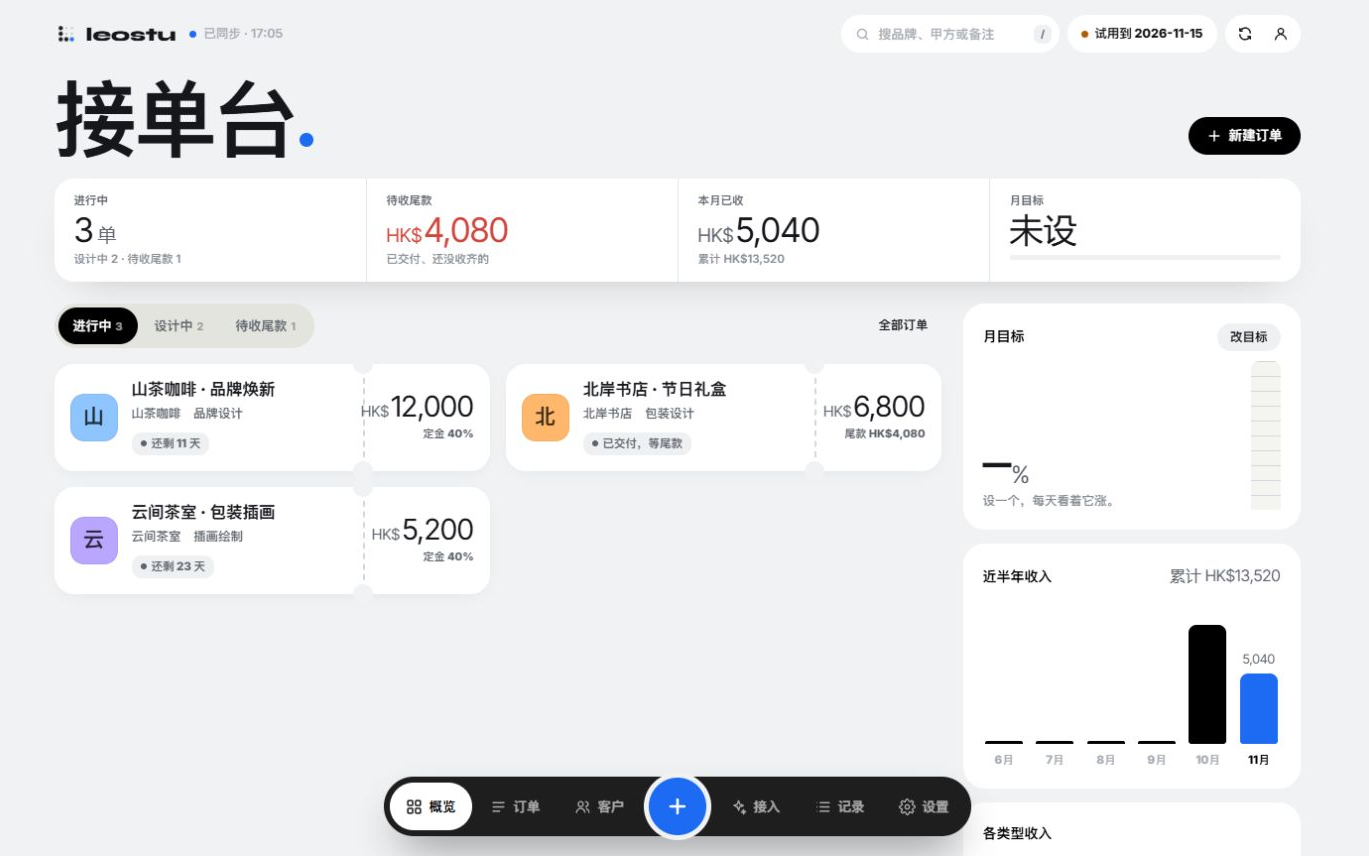
Leostu is a web workspace for independent designers and solo studios. Share contracts and invoices through one client link, collect signatures and record payments by receipt date. Leo AI turns chat screenshots into order drafts and helps with records and reminders. You confirm changes before they happen. Start free; Pro adds MCP and REST API, while AI includes 600 messages a month.

  • Web · desktop and mobile browsers
leostu.com
Leostu dashboard with active projects, outstanding balances and monthly income; demo data
01

Give Leo a screenshot. Review the order first.

Send client chats or quote photos. Leo extracts the client, items, amounts and deadline, and asks when information is missing. Ask about orders, clients, income or balances, or prepare payment records and reminders. Changes appear as confirmation cards and run only after approval. Up to 4 images per message; AI includes 600 messages a month, with 30 during the Pro trial.
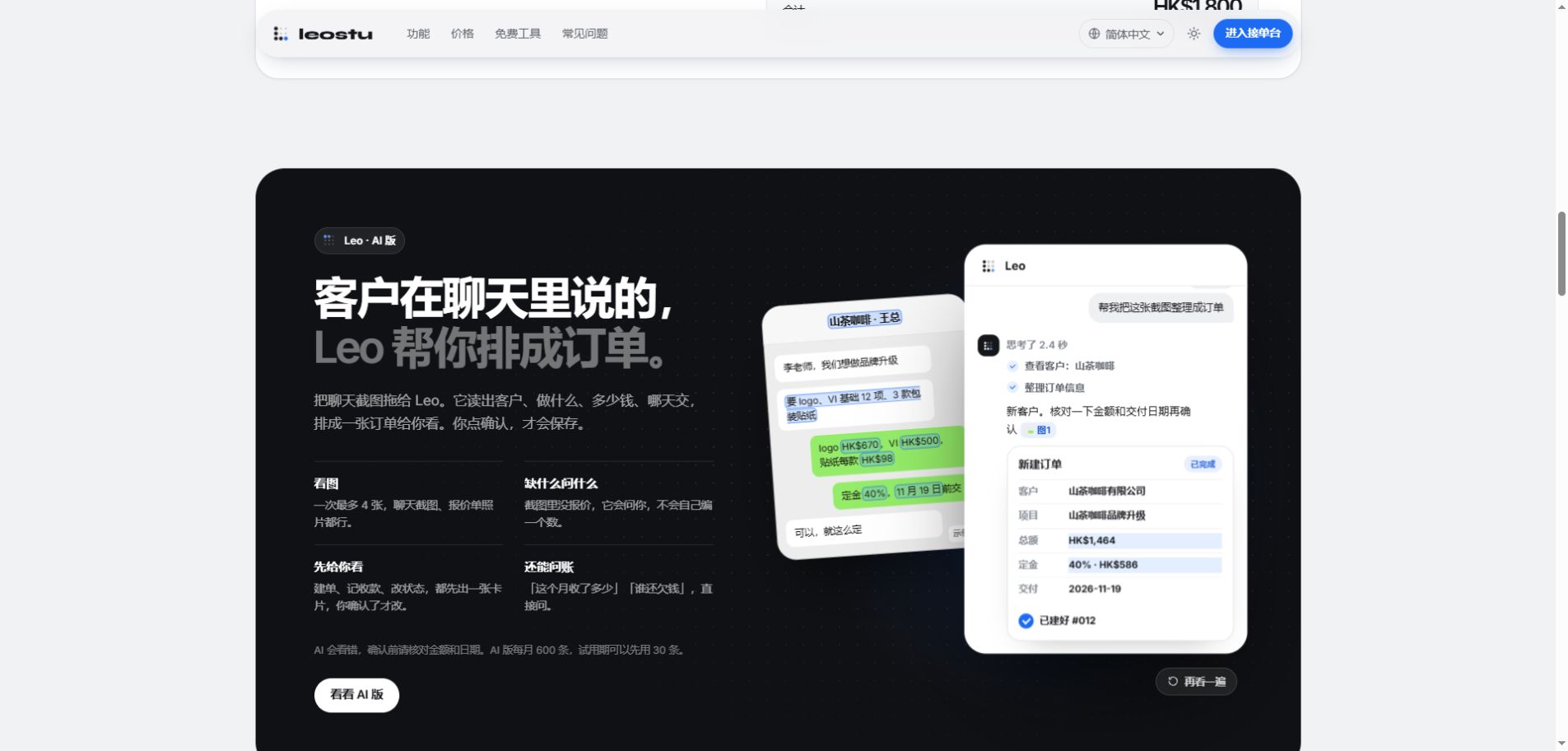
Leo's public demo turns a fictional client chat into an order confirmation card; no real client data
02

One order creates a contract and invoice

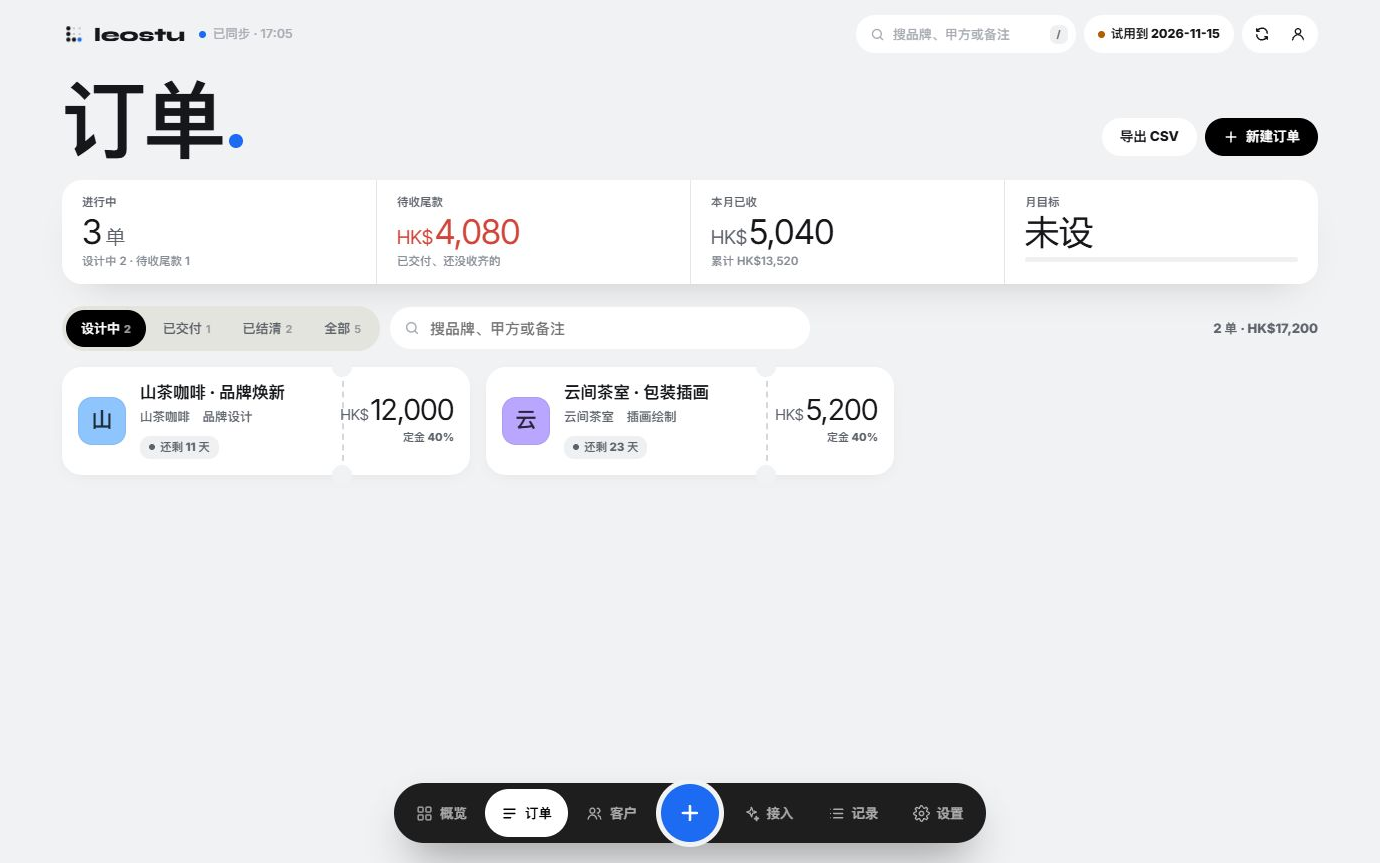
Enter the project, client, line items, deadline and deposit percentage. Totals calculate from quantity and unit price. Track work as in progress, delivered or paid, with categories and colours. Choose from 5 document styles in Chinese or English, and customise your studio heading, terms and payment instructions.

Demo order list with status filters and CSV export
03

Clients open a link to read and sign

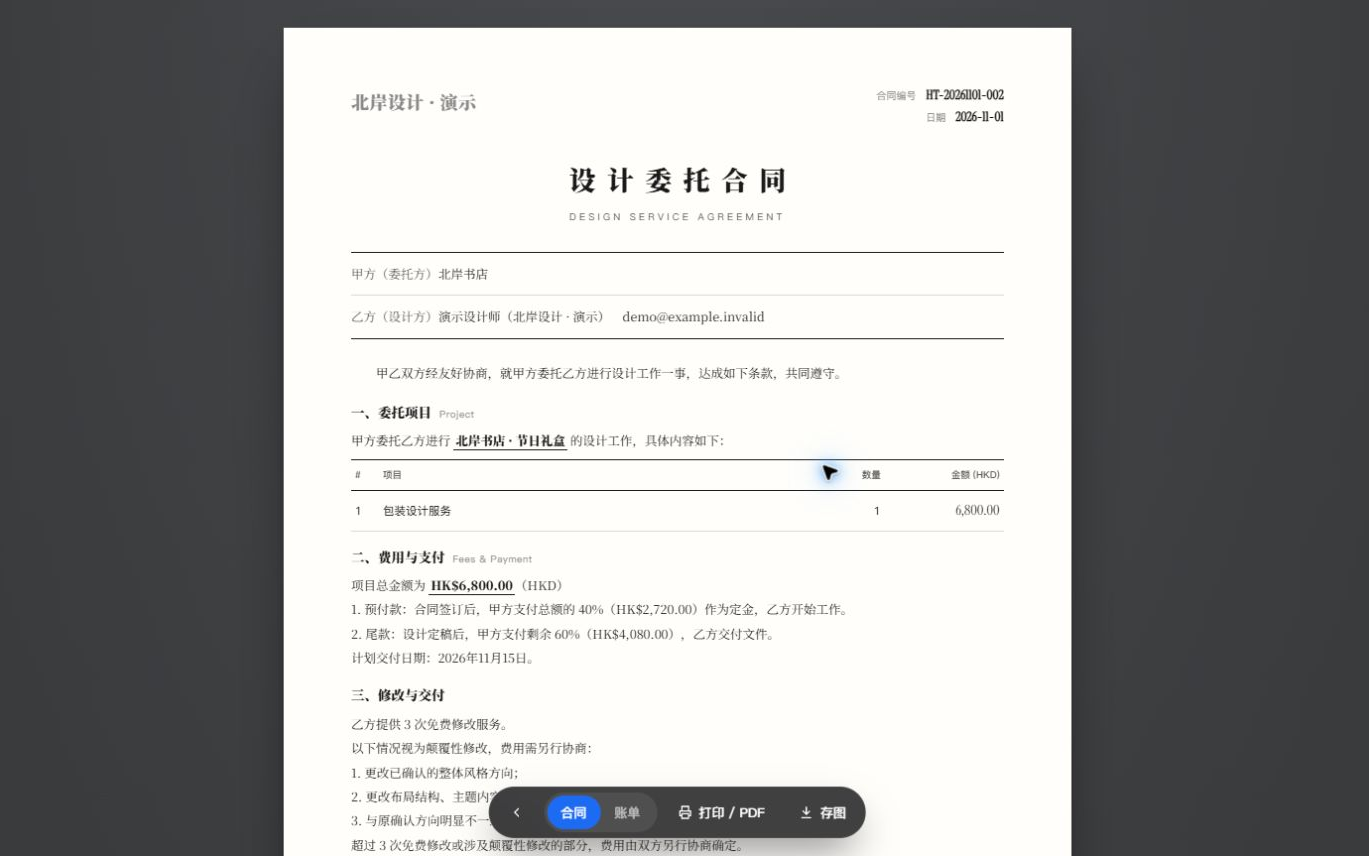
Share a link and access code. Clients need no account or app. They can draw a signature or scan a QR code to sign on their phone. Leostu records the signer, time, IP address and a contract fingerprint, and flags later content changes. These records do not guarantee legal validity in any jurisdiction.

Demo design contract showing the project, fees and deposit terms
04

Record each payment on its actual date

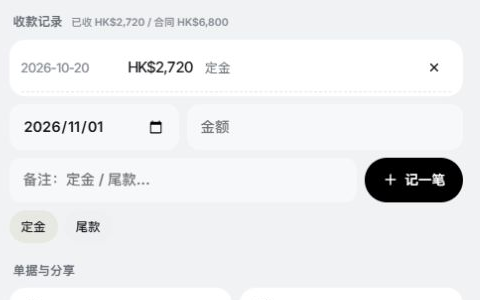
An order can have several payment records, each with an amount, receipt date and note. A deposit received in March and a balance received in April count in those separate months. Older paid orders without payment records still use their paid date. The dashboard, client view and monthly statement share this calculation; delivery and paid dates can also be entered retrospectively.

Demo payment ledger with a deposit and balance shortcuts
05

See who still owes a balance

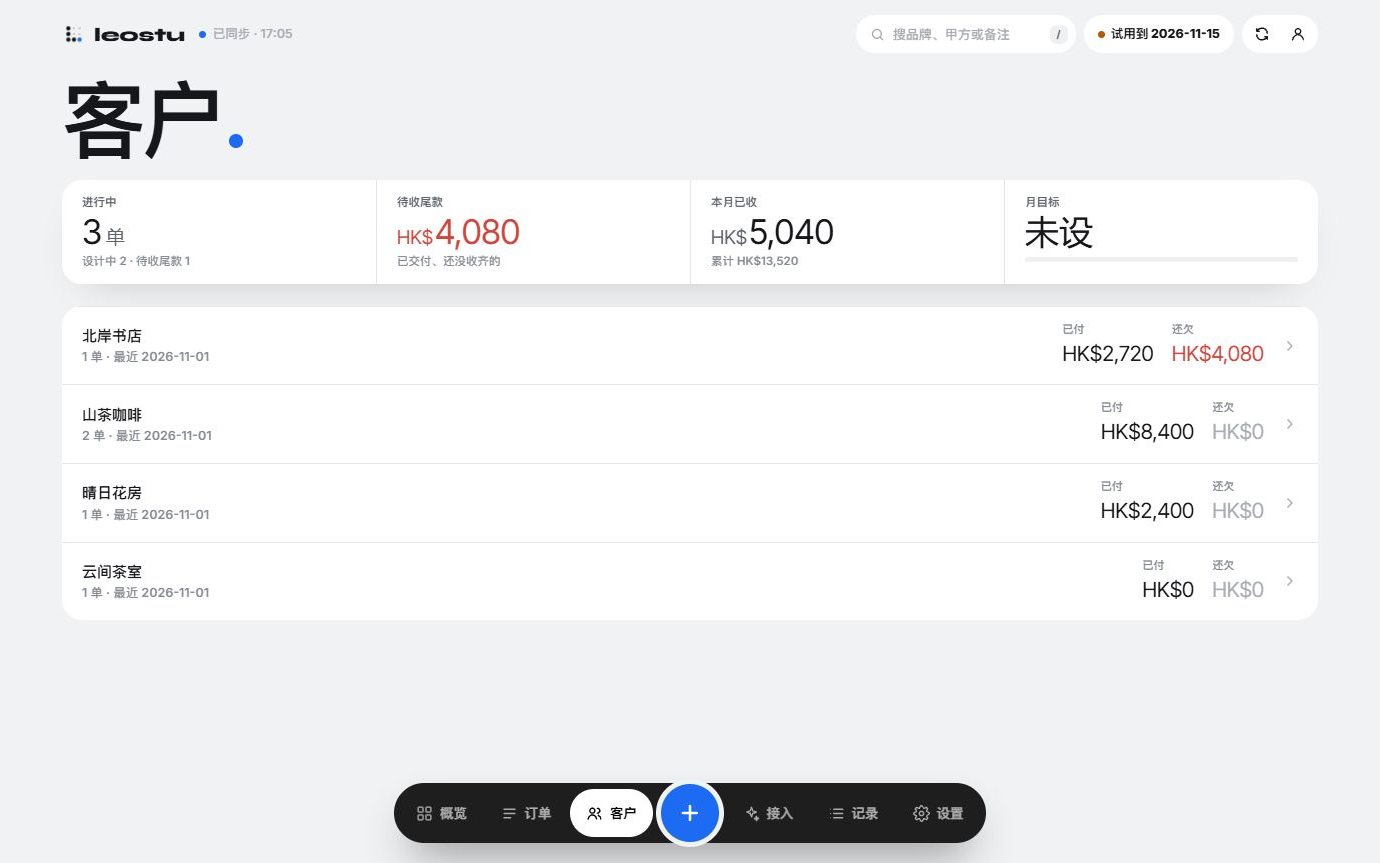
Review a client's orders, recorded receipts and outstanding balances in one place. Delivered but unpaid projects stay visible. Copy a reminder suited to the order's status, then send it yourself. Copy a monthly text statement to reconcile receipts and unfinished projects.

Demo client list with amounts received and outstanding balances
06

Keep currencies separate

Use HKD, CNY, MYR, USD, SGD and other supported currencies, chosen per order. Statistics use your account's main currency and list others separately. Different currencies are never added together or automatically converted.

Demo dashboard with HKD income and project balances
07

Export orders and print documents

Export all orders as CSV to continue checking them in a spreadsheet. Print contracts and invoices, save them as PDF through your browser, or save an image. Clients can read the web document without downloading a file first.

Demo order list and CSV export control
08

Let an agent handle records and reconciliation

Pro includes MCP and a REST API for finding, creating and updating orders, adding or deleting payment records, inspecting monthly receipts, and preparing statements and reminder text. Batch updates accept up to 50 orders with an independent result for each. Each agent has a separately revocable token. Order deletion requires your approval in the web app.

09

Three free generators, before you sign up

Use the design contract, designer invoice and payment reminder generators in your browser without an account. Enter project details, fees or reminder context, generate the text, then review it yourself. Contracts and invoices can be printed through the browser.

10

Find articles through linked resource lists

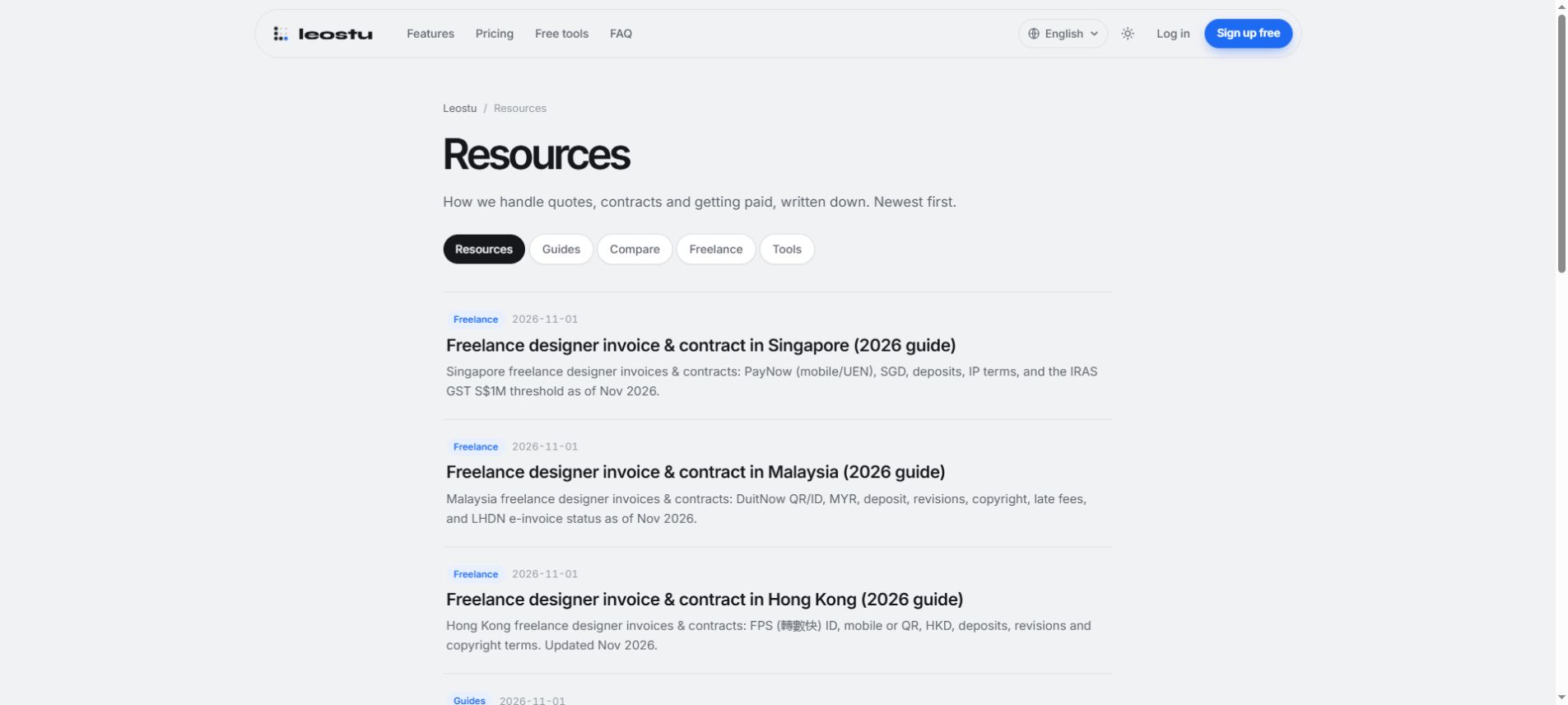
New /resources, /guides, /compare and /freelance lists show 20 articles per page. The homepage, articles, tools and footer link to relevant content. The site has 9 language paths, canonical and hreflang tags, structured data and a sitemap. Empty language categories link to English and use noindex. Administrators manage drafts, previews and publishing through /api/seo/v1.

Find articles through linked resource lists · Leostu v1.6.1
11

Site traffic and plan conversions, in aggregate

The separate read-only /api/stats endpoint aggregates daily visitors, pageviews, signups and Leostu plan payments, grouped by first landing page, referrer domain and UTM. Its tokens are separate from SEO tokens. It returns aggregate data, not designers' project payment ledgers.

Specs & requirements

Current version
v1.6.1 · 2026-11-02
Access
Online web app at leostu.com, for desktop and mobile browsers
Sign-in
Email account or Google; existing accounts with the same email require verification before linking
Languages and documents
Website and sign-up: 9 languages; account UI: Simplified Chinese, Traditional Chinese and English; documents: Chinese and English, 5 styles
Currency and dates
Currency per order; statistics grouped by currency; receipt, delivery and paid dates use the account time zone
Export and integration
Order CSV; browser print, PDF or image export; Pro MCP and REST API; up to 50 orders per batch update
Leo AI
Text and images; up to 4 images per message; streamed replies and confirmation cards; 600 messages/month on AI, 30 during the Pro trial
Checkout currencies
USD / HKD / CNY / MYR / SGD
SEO API
3 free generators; language paths, sitemap and structured data; /api/seo/v1 is managed by site-administrator tokens
Stats API
Site traffic and plan conversions, in aggregate · /api/stats · UTC · USD

What it can’t do yet

Better you know now than after you install it.

  • An internet connection is required. There is currently no usable native Leostu client for Windows, macOS, iOS or Android.
  • Accounts are for individual use. Team members, shared seats and team permission management are not available.
  • Drawn signatures are not CA-certified electronic signatures. No legal validity is guaranteed, and contract templates are not legal advice.
  • Leostu does not collect or hold project funds or detect bank or wallet receipts. Payment records must be entered manually or through the API.
  • Currencies remain separate. There is no automatic exchange-rate conversion, accounting system or tax filing.
  • PDFs are saved through browser printing, not generated by the server. Free allows 3 active orders; agents and API access require Pro.
  • Leo can misread images or instructions. Check amounts, currencies and dates before confirming; usage is limited. Text, images and necessary business context sent to Leo are processed by a model service. Upload only information you are authorised to share.
  • USD amounts in site statistics use fixed reference rates. They are estimates, not live currency conversion or financial statements.

Pricing

Free

Try the project workflow at your own pace.

USD 0free ongoing

  • Up to 3 active orders; paid orders do not count
  • Contracts, invoices, online signing and 5 styles
  • Leostu branding on documents; no agents or API
Create a free account

Pro

For ongoing freelance work or agent integration. USD 45 / year.

USD 5/ month

  • Unlimited active orders
  • Remove Leostu document branding
  • MCP, REST API, statements and batch updates
Start 14-day trial

AI

All Pro features, plus Leo AI. USD 108/year.

USD 12/ month

  • 600 AI messages a month; up to 4 images per message
  • Screenshot orders, account queries, receipts and reminders; confirm changes first
View AI plan

14-day Pro trial, no card; includes 30 AI messages. Monthly/yearly prices: Pro: USD 5/45; HKD 35/299; CNY 29/249; MYR 20/180; SGD 6/49. AI: USD 12/108; HKD 89/799; CNY 69/599; MYR 49/439; SGD 15/135. USD is the overseas default. Cards support subscriptions or one-off passes; HKD one-off checkout supports Alipay and WeChat Pay. Available methods appear at checkout. Project payments go directly to the designer.

FAQ

Can I keep using the Free plan?

Yes. New accounts receive 14 days of Pro without a card. Afterwards, Free allows up to 3 orders that are in progress or delivered but unpaid. Paid orders do not count. Documents carry Leostu branding, and agent and API access are excluded.

Do clients need an account to view or sign?

No. Send the contract or invoice link and access code, and they can view and sign in a browser. Share the code only with the intended client, and keep both the link and code safe.

Do project payments pass through Leostu?

No. Clients pay you directly using the payment details on your invoice. Leostu manages documents and records. Stripe checkout purchases Leostu Pro or AI plans; it does not collect your project payments.

What if a deposit and balance arrive in different months?

Each payment record counts in the month of its receipt date. An older paid order with no payment records counts its full amount on its paid date. Changing an order's delivery or paid status does not verify that money has reached your bank.

Does online signing replace a certified signing service?

Leostu stores the drawn signature, signer, time, IP address and contract fingerprint. It does not provide CA certification, notarisation or a guarantee of legal recognition. For contracts needing stronger identity checks or legal assurance, use a suitable local signing service and seek professional advice.

Can an agent delete my orders directly?

No. An agent can request deletion, but you must approve it in the web app. Issue and revoke a separate token for each agent. Queries, order editing, payment records and reconciliation through the API require an active Pro plan.

What happens when I cancel renewal or my plan expires?

Cancelling card renewal leaves Pro active until the paid period ends. Fixed-period purchases do not renew automatically. Your data remains on Free, but you cannot create another order while more than 3 are active. Agent and API access pause until you renew.

Can Leo change an order on its own?

Changes are shown in a confirmation card and run only when you approve. Leo asks when screenshot details are missing, but can still make mistakes. Check the client, amount, currency and dates. Open Leo at the bottom right or with Ctrl+J / ⌘J.

Does Pro include unlimited AI?

No. The Pro trial includes 30 AI messages. The AI plan includes all Pro features and 600 messages per month. The free plan has no ongoing AI allowance.

Which currencies and payment methods are available?

Choose USD, HKD, CNY, MYR or SGD; USD is the overseas default. Cards support subscriptions or one-off passes. HKD one-off checkout supports Alipay and WeChat Pay. Wallet purchases do not renew automatically; check available methods at checkout.

Changelog

  1. 1.6.1

    Resource lists, internal links and a read-only stats API

    • Find articles through linked resource lists: /resources · /guides · /compare · /freelance
    • Site traffic and plan conversions, in aggregate: /api/stats
    • USD amounts in site statistics use fixed reference rates. They are estimates, not live currency conversion or financial statements.
  2. 1.6.0

    Leo AI launches with five-currency plans and multilingual tools

    • Give Leo a screenshot. Review the order first. Text and images; up to 4 images per message; streamed replies and confirmation cards; 600 messages/month on AI, 30 during the Pro trial
    • Use the design contract, designer invoice and payment reminder generators in your browser without an account. Enter project details, fees or reminder context, generate the text, then review it yourself. Contracts and invoices can be printed through the browser.
    • Language URLs and a separate SEO content API: /api/seo/v1
    • Pro: USD 5/45; HKD 35/299; CNY 29/249; MYR 20/180; SGD 6/49. AI: USD 12/108; HKD 89/799; CNY 69/599; MYR 49/439; SGD 15/135.
  3. 1.4.3

    Payment records and income by receipt month

    • Record deposits, balances and instalments separately. Each receipt counts in its own month; older paid orders keep their previous calculation.
    • Edit delivery and paid dates. Dashboard, clients, monthly entries and statements use the same income rules.
    • Added REST and MCP payment-record tools and independent batch updates for up to 50 orders.
    • Improved date, currency and edit-conflict validation; fixed time-zone defaults, duplicate submissions and tutorial interactions.

Leostu

Contracts, invoices and balances.
One link for your client.

More from Oldlee